How to Read Your Vicinity Energy Bill

This guide explains what each section of your steam bill means, how your charges are calculated, and where to go if you have questions.

How Billing Works

Your monthly bill is based on the energy your building actually uses. To ensure accuracy, we collect meter readings either automatically from smart meters (or manually if needed). All meter data goes through a detailed review process to confirm it’s complete and correct.

Once verified, your usage information is sent to our billing system, where we apply the appropriate rates, taxes, and any adjustments. Each service area follows a specific billing cycle, so your invoice is generated on a consistent schedule.

If anything in the meter data needs clarification — such as an estimate or an unusual usage pattern — our billing, metering, and operations teams work together to resolve it. Your account manager is always available to help explain your usage, review your bill, or look into any concerns.

Talk to our team of energy experts today to learn how district energy can help buildings meet federal and local emissions requirements.

How does the billing process work in detail?

Blue and green gradient icon representing the benefit of renewable energy

How is my bill calculated?

Your monthly bill is based on the energy your building actually uses. To ensure accuracy, we collect meter readings either automatically from smart meters (or manually if needed). All meter data goes through a detailed review process to confirm it’s complete and correct.

Blue and green gradient icon representing project implementation service

How are meter readings collected?

Vicinity Energy typically uses a vortex meter to collect meter readings. A flow computer interpret data transmitted by the vortex meter and sends signals from the field into our billing system. The system is hardwired but has a battery backup for additional power. Mass flow data intervals are recorded every 5 minutes.

Blue and green gradient icon representing the benefit of lower costs

When is my bill issued?

Whether a customer is in Philadelphia, Boston, Baltimore, or another district, they receive bills on a predictable cycle and can reach out to their account manager or our customer service team if they have questions.

Your Meter & What It Measures

When steam enters a customer building it passes through a vortex meter— measuring both the pressure and flow of steam delivered to your building. The diagram below shows the full path: underground from our plant, through the Service Valve and Meter, up through the House Valve into your building, with condensate exiting via a separate line. Meter readings are recorded every 5 minutes.
Steam metering diagram Diagram showing steam flowing underground from the Vicinity Energy plant on the left, through a service valve and meter, rising up through a house valve into the customer building, with a condensate line exiting right. A dashed vertical line marks the building ownership boundary. VICINITY ENERGY PLANT CUSTOMER BUILDING Underground Steam Pipe Service Valve Meter House Valve Condensate Line

Steam flow path from the Vicinity Energy plant to your building.

Vicinity's Bill Pay Portal

Our online bill pay portal makes managing your Vicinity Energy account simple, secure, and convenient. Through the portal, you can pay your bill, view invoices, update payment methods, and enroll in AutoPay.

The portal supports ACH debit and credit card payments. Customers who enroll in AutoPay enjoy the added convenience of having their bill automatically paid each month — either on the due date or on a specific day you select. AutoPay can be changed or canceled at any time.

Whether you’re looking to make a quick one-time payment or want to view your most recent billing statement, the Bill Pay portal is designed to give you flexibility and control.

Your Meter & What It Measures

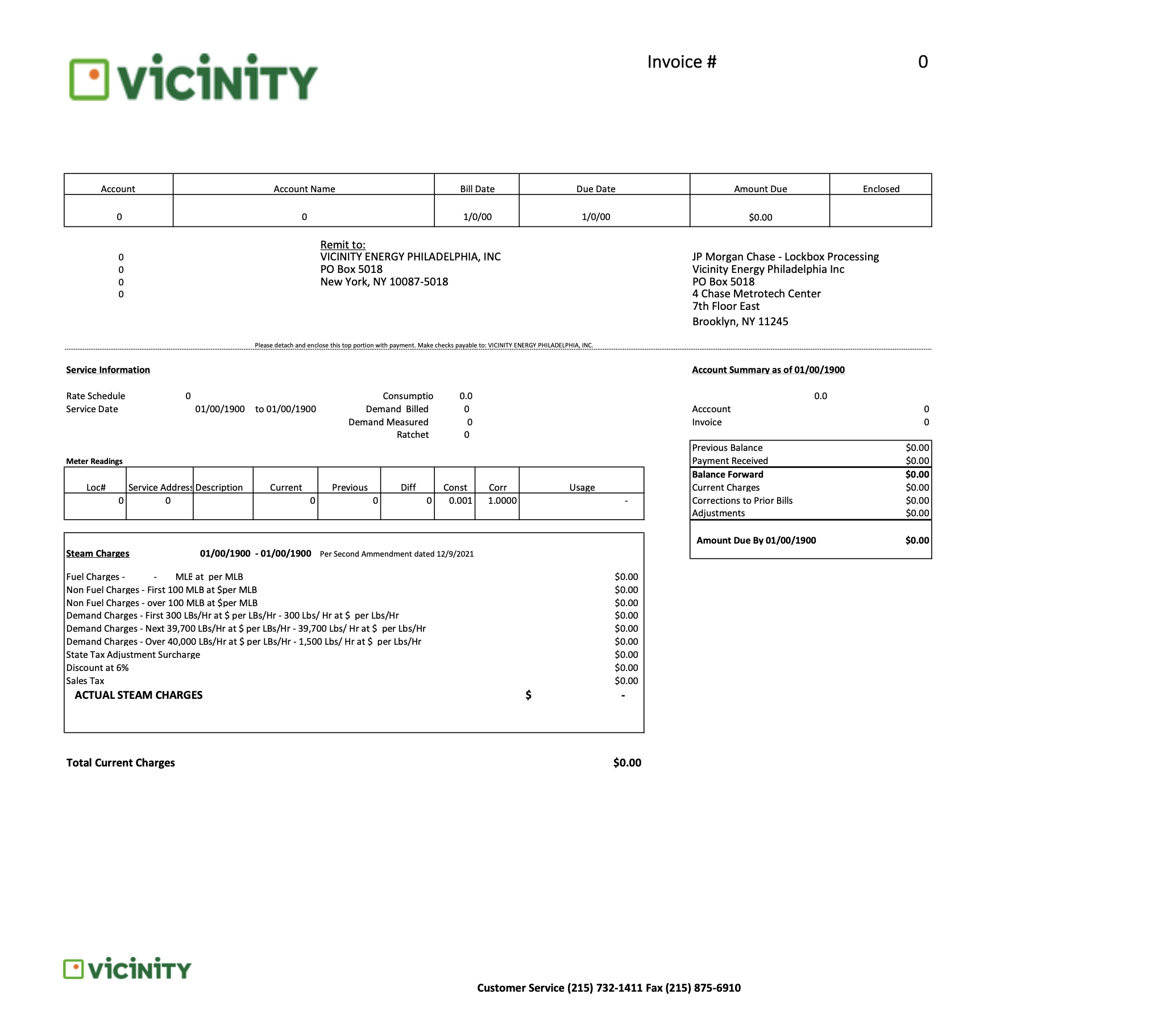
Click any numbered icon on the bill image to learn more about that section. Each icon corresponds to an explanation in the panel on the right.

Sample Vicinity Energy Bill

Instructions Click each numbered icon to learn what that part of your bill means.

Bill Sections

Common Billing FAQs

Billing

  • Steam pricing typically includes a capacity component and a commodity component, reflecting both infrastructure readiness and actual energy usage. Customers may elect varying levels of supply, and pricing is transparent, structured, and aligned with sustainability goals. We provide clear documentation, including how elections work and how charges appear on invoices.
  • Customers can view the following data on their meters:
    • Mass Flow [lb/hr]
    • Peak Demand [lb/hr]
    • Pressure [psi]
    • Temperature [if metered]
    • Total Usage [lbs]
    • Power status (power outage indicator)
  • Customers often see usage changes due to weather, building operations, or meter read timing. Smart meters report interval data, but manual meters may create estimated reads if access was delayed. Account managers can request a usage review, pull interval graphs, and verify if any spikes or validation flags occurred.
  • Vicinity bills customers on district-specific billing cycles. Once reads are processed, we generate an invoice. Customers can generally expect bills on the same cadence each month unless a manual meter delay or off-cycle billing event occurs. In most cases, customers receive their bills during the first week of each month.
  • Yes. If the customer is on smart meters, interval data is available and can be shared by your account manager. Manual meters do not produce interval data; only monthly reads are available.
  • Yes. Usage history is stored in our system, and customers can download historic usage and bill PDFs. Account managers can also export interval or register-based usage for any date range.
  • Your account PIN is printed on your invoice underneath the account name and is used alongside the account number for bill pay and portal registration.
  • Bills are estimated when we do not receive a valid read — common with manual meters, site inaccessibility, or meter failure. The billing team applies estimation logic until an actual read is available, which may result in catch-up adjustments the following month.
  • Mlbs is a unit of measure for one thousand of pounds of steam. 1 Mlbs = 1,000 pounds of steam.

Have a question about your bill?

Your Account Manager is your first point of contact. You can also reach our 24/7 Philadelphia support line or contact us online.